Blog
How a custom CRM drives customer retention.
Keep the whole customer in one record, make renewals and check-ins happen on schedule, segment by what predicts churn, and act on the warning signs while there is time.
A CRM improves customer retention when it puts every renewal date, support ticket and past conversation about a customer in one record, then prompts someone to act before the customer leaves. Retention depends on catching the quiet warning signs early enough to respond, and on nobody forgetting the follow-up.
This guide walks through how a CRM shaped to your business tracks the customer lifecycle, keeps renewals and check-ins on schedule, segments accounts, flags churn risk and turns all of that into concrete action. Retention is worth the effort. Research by Frederick Reichheld of Bain & Company, summarised by Harvard Business Review in 2014, found that raising customer retention rates by 5% increased profits by 25% to 95%. The range is wide because it spans very different industries, but the direction is the point: a CRM is where the work of keeping customers either happens or gets missed.
Why does tracking the full customer lifecycle matter?
Retention problems rarely announce themselves, and the companies that keep customers tend to be the ones paying closest attention to them. In Forrester's 2024 US Customer Experience Index, organisations it classed as customer-obsessed reported 51% better customer retention than the rest. That is a self-reported association, and only 3% of companies qualified, but it shows how much attention to the customer is worth.
A single customer touches many parts of a business: onboarding, billing, support and account reviews. When those records live in separate tools, nobody holds the whole picture. The warning signs sit in different places, and no one connects them.
A CRM is where that timeline should live. In our own CRMNow, a company's page shows its contacts, open support tickets, deals, quotes and invoices together, and custom fields let you add what your business tracks on top, such as a contract end date or a service tier. When an account manager opens the record, they see what the customer bought, what they owe and where friction has appeared.
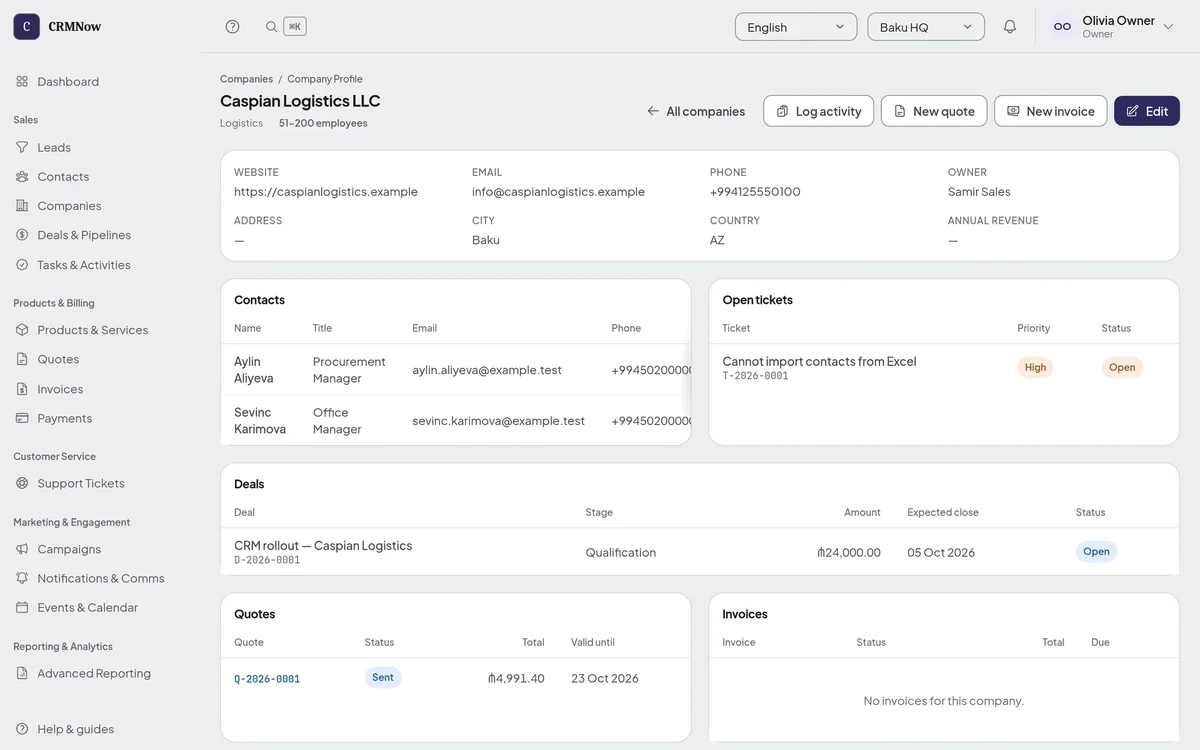
The same view protects the relationship when staff change. A rep who inherits an account can read its history in minutes rather than piecing it together from email threads and memory, and a handover is often when customers feel neglected and start looking elsewhere.
How does automating renewals and check-ins reduce churn?
Automation removes the human gaps where customers slip away. Some of those gaps are not decisions at all. In its State of Retention 2025 report, Churnkey, which sells churn-reduction software to subscription businesses, analysed 15 million subscriptions across more than a thousand companies. Voluntary churn, customers choosing to cancel, hovered around 7% a month in 2024, while involuntary churn, mostly failed card payments, centred around 1%. Of the involuntary churn it detected, 70% was recovered with its own payment retries and reminders, and 42% with reminder emails and SMS alone.
Renewals get missed for ordinary reasons. A reminder lands in the wrong inbox. A card expires silently. A quarterly check-in never gets scheduled because the account owner is busy. Each gap is small, and each one leaks revenue.
The fix is rules you define, so the follow-up does not depend on someone remembering. In CRMNow, a workflow can watch for a deal's status changing to won and create a check-in task for the deal's owner, due a set number of days later: ten for an onboarding call, or eleven months on for a yearly renewal conversation. Another can send an email or notify a named colleague when a high-priority ticket is opened. It cannot yet fire on a date approaching on its own, so "ninety days before the contract ends" is set up as a task with a due date, and an overdue task can trigger its own workflow.
Consider a tour operator with seasonal clients. A check-in two months before each client's usual booking window arrives long before a competitor's pitch. The timing is automated; the conversation stays human. That balance is where retention quietly compounds.
How does segmenting customers improve retention outreach?
A single message cannot fit every account, because churn varies sharply by sector. In 2025 benchmarks from CustomerGauge, which sells customer-experience software, average B2B churn ran from 12% in IT services to 27% in professional services, and higher still in logistics and wholesale. A customer in a high-churn segment needs attention a stable one does not.
Segmentation sorts customers by the traits that predict their behaviour: contract value, tenure, industry, support load and, if you can capture it, how much they use what you sell. Once the CRM holds clean data on each, it can group accounts and route each group to the right play:
- High-value accounts get regular business reviews and a named contact.
- New customers enter a structured onboarding sequence that heads off early frustration.
- Quiet accounts get a call or targeted help before they decide the product is not worth renewing.
The segments should reflect what matters in your market. A hotel might segment guests by booking frequency and season; a school by enrolment stage; a B2B service by contract size. That is what custom fields and list filters are for: the groupings come from your criteria, not from a vendor's template.
How do you spot churn risk early?
You track leading signals rather than waiting for a cancellation. The signals are often subtle: log-ins drop, support tickets wait longer for an answer, a key contact leaves, a renewal conversation is postponed twice. Individually they look minor; together they form a pattern.
Some CRMs weight those signals into a health score for each account and raise an alert when it crosses a threshold. That only works if the score reflects your real churn drivers. One business loses customers to slow support, another to seasonal budget cuts, and a score built on the wrong signals cries wolf until people stop reading it.
CRMNow does not calculate a health score, and it does not see how customers use your product unless someone records it. What it can do is make the signals it holds visible and act on them: open tickets sit on the company record, overdue tasks trigger workflows, and a custom field such as "at risk" can be set by hand or by a workflow and then used to filter lists. When a business needs scoring of its own, some requests are small enough that we simply add them, and larger ones become a custom module built on top of the same system, with the same updates and permissions as everything else.
How do you turn retention insights into action?
Wire what the CRM finds into daily work. Data only helps if it reaches someone who can act while there is still time. A dashboard nobody opens changes nothing; an alert that creates a task does.
- Give every at-risk account an owner and a next step, both recorded in the CRM. The system should create the task, not rely on someone remembering to check.
- Close the loop. When an intervention happens, log the outcome, so you learn over time which plays recover which segments.
- Review the numbers that matter: churn by segment, renewal rate, recovered accounts, and the time between the first warning sign and the save.
The payoff is a retention routine that runs on its own data: the lifecycle is in one place, follow-ups happen on schedule, segments get the right outreach, and risk surfaces early enough to act. For the wider choice of system, see custom CRM vs off-the-shelf and how to build a CRM your sales team will use.
Questions about CRM and customer retention
What is CRM customer retention?
Using a customer relationship management system to keep existing customers active and renewing. The CRM holds contract dates, support tickets and account history, and prompts timely outreach that reduces churn.
Why build a custom CRM instead of using an off-the-shelf tool?
A CRM shaped to your business holds the fields your retention work depends on, such as your renewal cycle, your churn signals and your segments. Generic tools can force your process into their fields, which leaves the data you need scattered or missing. The trade-off is cost and time, so check first whether a ready-made system with custom fields already covers most of it.
How does a CRM help spot churn risk early?
By keeping the leading signals, such as open tickets, overdue follow-ups and postponed reviews, in one place and prompting someone when they appear. Some systems combine them into an account health score; whether that helps depends on how well it matches what actually makes your customers leave.
Does customer retention actually affect profit?
Yes. Research by Frederick Reichheld of Bain & Company, as summarised by Harvard Business Review, found that a 5% increase in customer retention increased profits by 25% to 95%.
Map your retention workflow end to end this week: where renewal dates live, who owns each account, and what happens when a ticket goes unanswered. The gaps usually show up within an afternoon. Tell us what you find and we will show you which of them CRMNow closes today and what would need building.