Blog
Managing multiple hotel properties from one PMS.
What a multi-property system does, which features vary most between products, and the signs that it is time to stop merging spreadsheets.
A multi-property hotel management system lets one operator run several hotels from a single login, with group reporting, per-property settings and controlled staff access. Instead of logging into a separate tool for each location, your team works in one place and owners can see the whole portfolio. This guide explains what that setup does, where it helps and when it is worth paying for.
Hotel groups rarely start out managing multiple properties. More often, a successful independent hotel adds a second location, then a third, and the back office quietly turns into a tangle of duplicate logins and merged spreadsheets. Multi-property tooling exists to stop that tangle before it slows down decisions.
What a multi-property hotel management system actually does
It connects the day-to-day operations of several hotels under one account while keeping each property's data separate and correct. Front desk staff at each hotel work only with their own property. Regional managers and owners can step back and see any property, or all of them together.
Cloud delivery is what makes this practical, since staff have to reach the software from every location. According to Global Market Insights, cloud systems already held over 80% of a hotel PMS market worth USD 3.6 billion in 2024. For more on what a PMS covers in general, see choosing a hotel PMS.
Centralised control across properties
Centralised control means one interface governs every property, so staff stop switching between disconnected systems. A manager on the road sees the same numbers as the clerk at the desk. With a stack of separate installations, someone has to collect and reconcile figures by hand every morning.
Depending on the product, centralisation can cover:
- A single list of all properties with live occupancy and arrivals.
- Cross-property reservations, so overflow at one hotel can book into another.
- Shared guest profiles, so a returning guest is recognised across the portfolio.
- One place to push a rate change or a policy update to selected properties.
Those last three vary widely, so ask to see each one working, not just listed. Our own PMSNow gives one login a switcher across all your hotels and a group view of live figures, but it treats each hotel as its own unit. Guest records and rate plans belong to one hotel, and it does not book across properties or push a rate change to several at once. If your group runs on those, tell us before you choose.
Shared reporting and consolidated revenue views
Consolidated reporting rolls every property's numbers into one view, which removes the spreadsheet merge that slows group-level decisions. It is also hard to fake with separate systems. When reporting is truly shared, an owner can answer questions that cross properties without exporting anything:
- Portfolio-wide occupancy, ADR and RevPAR for any date range.
- Revenue by property, side by side, with the group total.
- Which locations are pacing ahead of or behind last year.
- Housekeeping and maintenance load across the whole estate.
That matters when teams are stretched. In a survey of 246 US hoteliers by the American Hotel & Lodging Association in February 2026, more than half said their properties were somewhat or severely understaffed. Every hour spent stitching spreadsheets together is an hour not spent on guests.
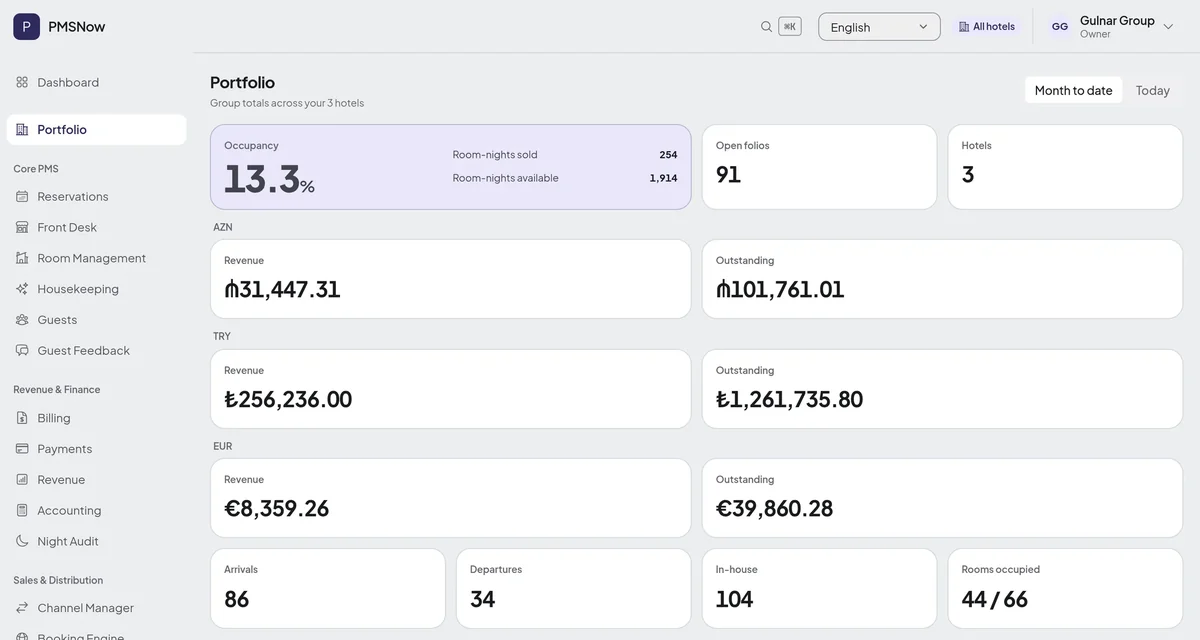
The screen above is PMSNow's Portfolio page, shown with a demo group. An account owner with more than one hotel sees group occupancy, revenue, outstanding balances, arrivals, departures and in-house numbers, for today or month to date. Each hotel is read in its own timezone, and money is never added up across currencies: a group trading in manat, lira and euro gets one row for each. It shows group totals rather than the fuller list above. ADR and RevPAR sit on each hotel's own dashboard, so a side-by-side comparison of properties still means opening them in turn.
Per-property configuration without chaos
Per-property configuration lets each hotel keep its own rooms, rates, taxes and policies. A good system treats every property as a distinct unit of configuration, not a copy of a template you can never bend. In practice, each property defines its own:
- Room types, floor plans and inventory counts.
- Rate plans, seasonal pricing and local taxes.
- Check-in and cancellation policies.
- Payment rules and local currency, where locations differ.
The discipline that prevents chaos is the separation between shared defaults and local overrides. A group can set a standard cancellation policy once and apply it everywhere, then let a resort override it for peak season. Without that layering, operators either force every hotel into one rigid mould or let each one drift so far apart that group reporting stops making sense.
Few things show the difference between products more clearly, so test it in a demo. In PMSNow, each hotel has its own room types, rate plans, tax rates, check-in time, currency and timezone, but there is no layer of group defaults: you set each hotel up separately.
Staff roles and permissions at scale
Permissions should work by both job and property, so each person sees only what their work requires. A front desk clerk works inside one hotel. A regional manager oversees a cluster. An owner sees the entire portfolio.
This matters more as staff come and go. In the same AHLA survey, 70% of respondents said they were offering higher wages to recruit and retain staff, and 54% flexible scheduling. Hotels working that hard to keep people are also onboarding and offboarding them, and access should be quick to grant and quick to revoke. A few rules help:
- Scope access to the smallest set of properties a role needs.
- Separate operational roles, such as front desk and housekeeping, from financial ones, such as reporting and refunds.
- Keep an audit trail of who changed rates, voided charges or edited bookings.
PMSNow grants each staff member specific hotels and specific modules, checked on every page and action. The right to sell below the published rate is given separately, per person and per hotel, and changes to reservations, rate plans and folio charges are recorded in an activity log.
When to invest in multi-property tooling
Invest once you run two or more hotels and spend real time reconciling data between them. The trigger is rarely the second property alone. It is the moment manual coordination starts costing more than the software would. A few signs you have reached it:
- You keep a master spreadsheet that someone updates from several systems each day.
- A rate or policy change has to be entered separately in every property.
- You cannot answer a portfolio-wide revenue question without an export and a merge.
- Onboarding staff across properties means creating accounts in several tools.
Ready-made platforms work for many groups. Operators with unusual portfolios, mixed property types or specific workflows can reach the limits of generic software, and that is when a custom-built PMS can earn its cost.
If you manage more than one property, audit one week of your back-office work. Count the hours spent merging reports, re-entering rate changes and managing logins across properties. That number is your real budget for a multi-property system, and it tells you which of the features above you need. To see how far a ready-made system goes, request a PMSNow demo and ask to see the Portfolio page with several hotels loaded.