Case study · Equipment map
Every machine on one live map, and its whole story one tap away.
The same operator tracked its fleet on a shared online map and a pile of spreadsheets. We turned that into a multi-user system where each pin knows its readings, its inspections and its last service visit.
Client name withheld. For security and commercial confidentiality we do not name the operator or show its map, because the map is the location of every machine it owns. Everything below describes the system as it runs in production today.
- Client
- A leading company in its category; name withheld
- Industry
- Drinking-water vending and water treatment
- Who uses it
- Field technicians, office staff, administrators
- Languages
- Azerbaijani, Russian and English, editable in the app
- Delivered
- Built in September 2025, extended ever since
The starting point: a map nobody could share properly
The operator's fleet of vending and purification units was plotted on a free online map, while each machine's technical readings (water quality, membrane condition, which filter stages it carried) lived in spreadsheets. Knowing a machine meant opening two things and hoping they agreed.
Our first answer, in mid-2025, was deliberately small: a one-page map that proved the idea in days. It also showed its limit quickly. The pins lived in one browser, sharing them meant passing a file around, and one password opened everything. The idea was right. It needed to become a system.
A pin should not just say where a machine is. It should say how it is doing.
What we built
-
One map for the whole fleet, fast at any zoom
Every machine is a pin, coloured by category and grouped into clusters when you zoom out. The map loads only what is on screen, so it stays quick on a technician's phone. A "locate me" button finds the nearest machines in the field, and a pin that was placed a few metres off can simply be dragged to where the machine really stands.
-
A pin that carries the machine's record
Type an equipment code and the pin fills in its technical data from the imported equipment register, updated in bulk from the client's own Excel files. Administrators define any extra fields they need (eleven types, including photos and documents) without asking for a developer. Open a pin and you see the machine, its latest service visit and its three most recent inspections in one place.
-
Service history that arrives by itself
Twice a week, early in the morning, the map pulls every completed visit from the operator's field service system and files it under the right machine. Each visit is recognised by its own ID, so running the import again changes nothing unless the data did: a visit can never be counted twice.
Addresses that do not match a pin are listed for the office rather than silently dropped. The screen even warns about Cyrillic and Latin letters that look identical, because two of the only five mismatches in the fleet turned out to be exactly that. The client chooses which service columns appear on the map, labelled in all three languages.
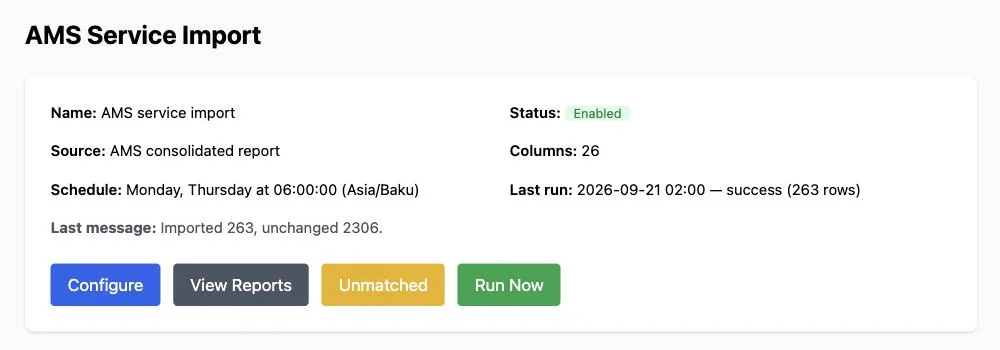
The service import runs on Monday and Thursday at 06:00 and reports how many visits it brought in or left unchanged. 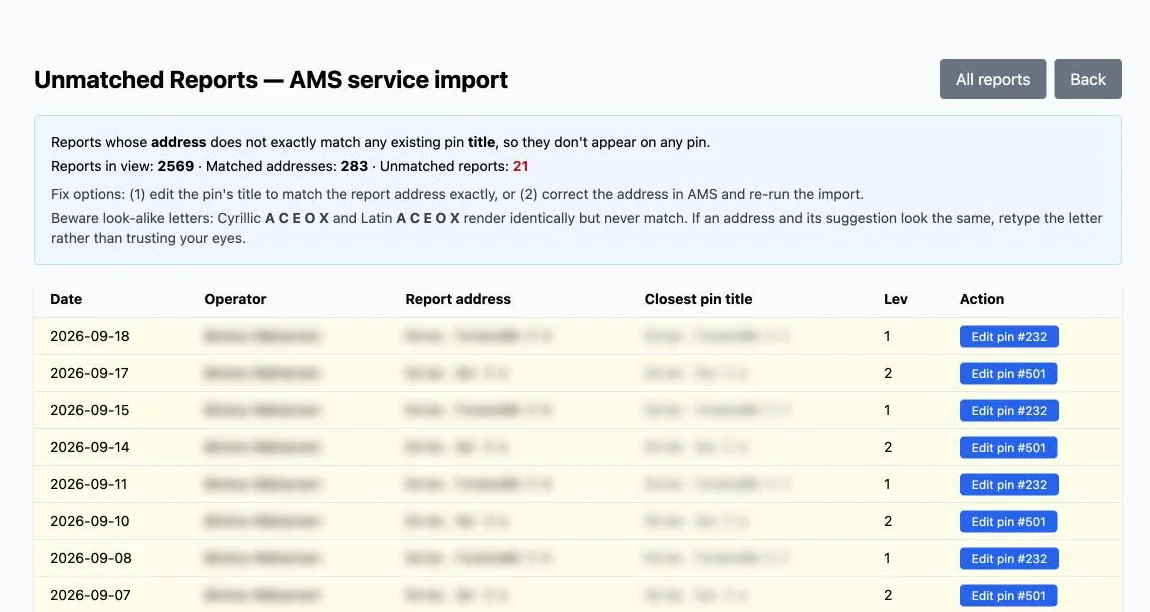
Addresses that matched no pin, each with its closest pin and a warning about look-alike Cyrillic and Latin letters. Operators and addresses blurred. -
Inspections from the pin itself
A technician standing at a machine opens its pin and records an inspection against the client's own checklist, rating the machine as OK, needs attention or critical, with a note. An honest mistake can be withdrawn within fifteen minutes; after that it is part of the record. A split view shows every machine on one side and its full inspection history on the other.
-
Search that speaks water treatment
Beyond search by address, code and category, the filters are built for this trade: find every machine within a range of water-quality or membrane readings, or every machine that carries a particular filter stage, ozonator or UV lamp. Any filtered view exports to CSV or JSON.
-
Control without bottlenecks
Five roles from technician to super-administrator, with 48 individual permissions the client's administrator can rearrange from a screen, and a rank rule that stops anyone editing an account above their own. New pins can go through moderation before they appear. Every administrative action is written to an audit log, and backups can be taken and downloaded from inside the app.
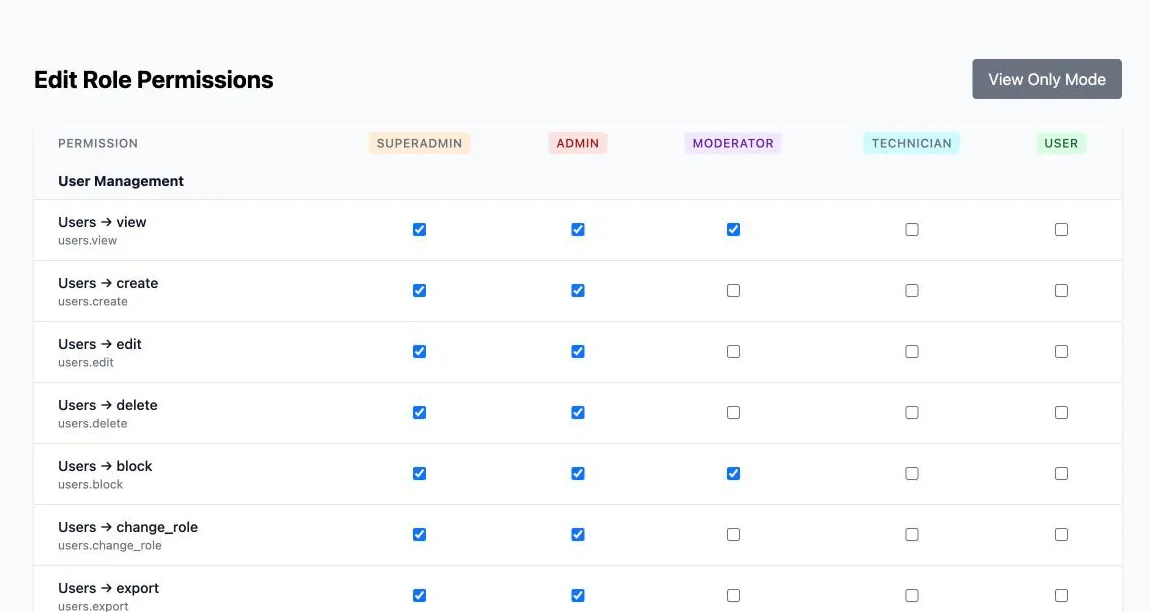
The role-permission grid the client's own administrator edits: five roles, one row per permission.
What changed
| Area | Before | Now |
|---|---|---|
| Where machines are | A shared online map plus a file passed around | One multi-user map, with roles and moderation |
| Machine data | Spreadsheets opened beside the map | On the pin, filled in from the equipment code |
| Service history | Copied between sheets by hand | Imported automatically twice a week, never duplicated |
| Inspections | Not recorded in a searchable way | A checklist on the pin, with full history per machine |
| Who can do what | One password for everything | Five roles and 48 permissions, and a log of every admin action |
Engineered to change safely
This system has grown with the business for a year, so it was built to take changes without drama. The service-data feed began life reading a shared online spreadsheet. When the field service system came online in 2026, we switched the map over to it directly and removed the old dependency altogether, which cut the application's third-party code by more than two thirds. Every database change was proven reversible before it reached production, a backup was taken before every step that could not be undone, and 90 automated tests guard the data feed between the two systems, the inspections and the permissions.
The other half of the story Nearly 300 machines, two visits a week each, and not one spreadsheetIs your equipment scattered across a map and a spreadsheet?
Vending machines, meters, antennas, kiosks, pumps: if what you look after stands at an address, the same approach applies. We build it around your data and your people, then keep it running.