Case study · Field service management
Nearly 300 machines, two visits a week each, and not one spreadsheet.
A leading drinking-water vending operator ran its service rounds, filter life and spare parts on workbooks and phone calls. We replaced all of it with one system its technicians carry in their pocket.
Client name withheld. For security and commercial confidentiality we do not name the operator, its locations or its staff. Everything below describes the system as it runs in production today; the figures are counted, not estimated.
- Client
- A leading company in its category; name withheld
- Industry
- Drinking-water vending and field service
- Who uses it
- Technicians on phones, office moderators, administrators
- Languages
- Azerbaijani, Russian and English, per user
- Delivered
- Technician app in June 2026; warehouse ledger ten weeks later
The starting point: a fleet run from workbooks
The operator runs a network of drinking-water vending machines, each one fitted with filter cartridges, a UV lamp and a water meter, and each one due a technician's visit twice a week. Before this system, the business ran on Excel. One workbook held the machine list. Another worked out, by hand, how much life each filter cartridge had left, by subtracting an old meter reading from a new one. A third, with 22 tabs, tried to track spare parts across the main warehouse, the technicians' vans and the machines themselves.
Technicians had no structured way to report a visit. Readings, replaced parts and problems came back by phone and message, and the office retyped them. Nobody could say, at a glance, which machines had missed their visit this week, or which filter was about to run out.
Every visit was work done. Very little of it became data.
What we built
-
A service visit that fits on a phone
A technician opens their own list of machines and walks through the visit in order: checklist, meter and quality readings, parts used, repairs with photos, done. One visit produces one complete report. Photos are resized on the phone before they upload, so a weak mobile signal is not a reason to skip them, and they are filed automatically into the client's own cloud storage, one folder per machine.
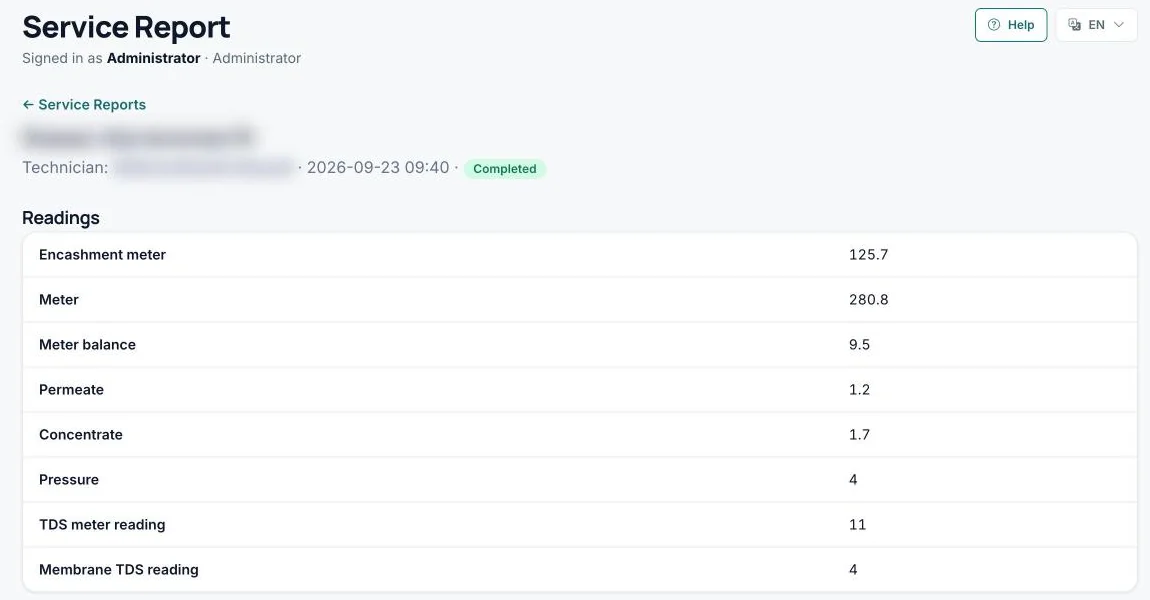
A completed visit as the office sees it: every meter and water-quality reading, in the order the technician took them. Address and technician blurred. -
Filter life that calculates itself
Every meter reading now recalculates the remaining life of every meter-based part on that machine, using the same formula the client's workbook used. When a cartridge reaches its rated capacity, the machine shows Replace. A swapped meter is detected rather than read as a negative consumption. When a technician ticks "replaced", the office confirms the reset, so the count cannot restart by accident.
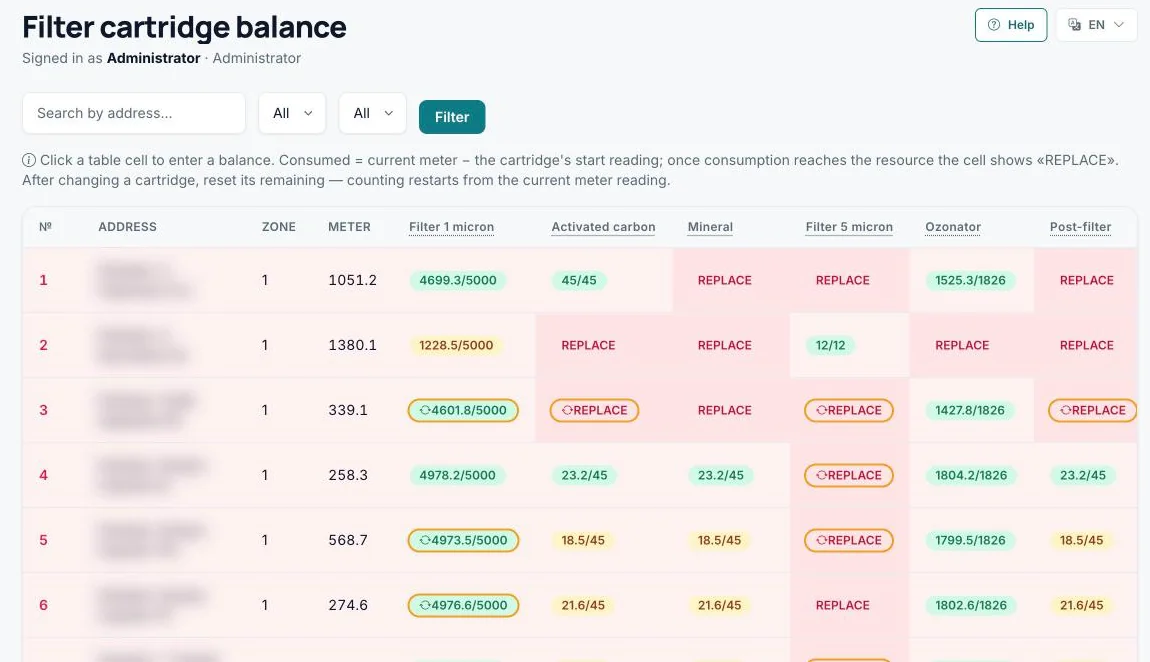
Remaining life of each cartridge, recalculated from every meter reading. Past its rated capacity, a cartridge shows REPLACE. Addresses blurred. -
Coverage the office can see
Each machine has a Monday and a Thursday slot. A coverage board lists every machine, worst-served first, so a missed visit surfaces the same week instead of in next month's complaint. Technicians see the same thing on their own screen as a simple "1/2 this week" badge.
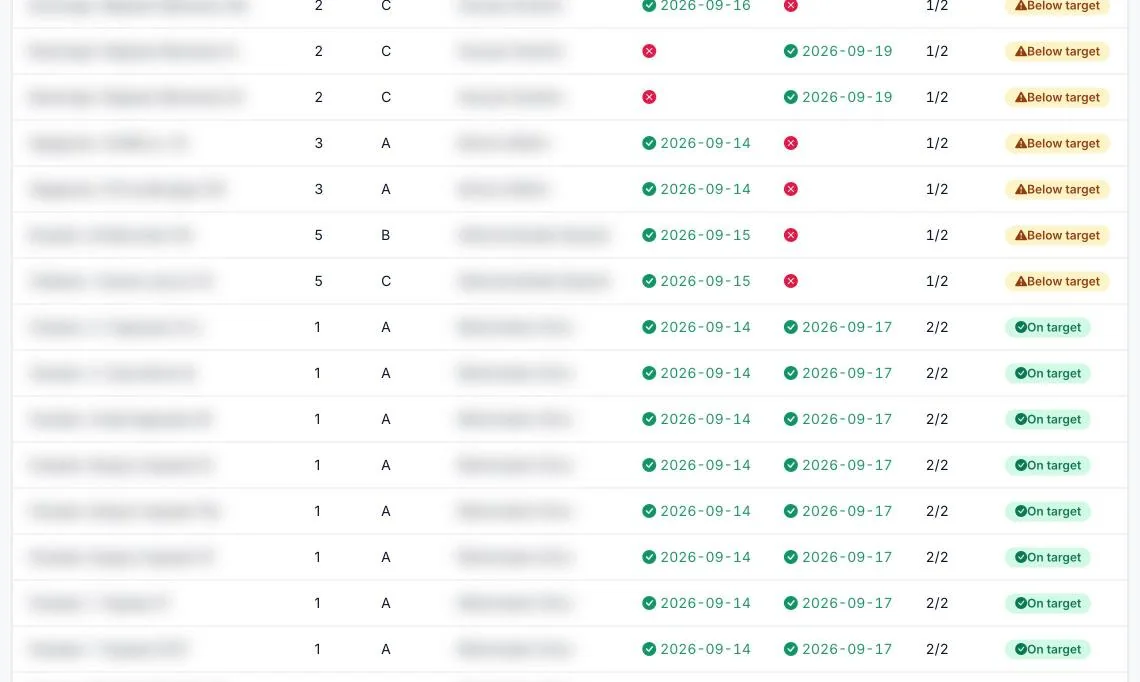
Last week's coverage board: machines that missed a visit sit above those on target. Addresses and technicians blurred. -
Every new task lands on the technician's phone
Each time the office assigns a task, the technician it is assigned to gets a notification on their mobile phone. Every task, for every technician, arrives within minutes as a Telegram message: what needs doing, the address of the machine, the deadline and a link that opens the task directly. Nobody has to phone round, and nobody can say they never heard about it.
The phone stays in the loop after that. The technician is notified again when the office replies to them or reopens a task, and reminded at 08:00 on the day a task is due, always in their own language. Connecting takes one tap from their profile, and if the messaging service is briefly unavailable, delivery retries on its own.
In the office, every task has a comment thread and moves from pending to in progress, completed and reviewed, so "I told him" becomes a record with a time on it.
-
A spare-parts warehouse that cannot lie
The 22-tab workbook became a stock ledger. Stock is never typed in: it is calculated from every receipt, issue to a van, use on a machine, return, repair and sale. No movement can be edited or deleted. A mistake is corrected by a reversal that can only happen once, and stock can never go below zero. Returned parts follow a repair path from inspection to restored or scrapped, and scrapping needs a second person's approval.
On top of the ledger sit the reports the workbook was trying to be: stock held by each technician, a reorder plan, ABC analysis, cost by machine, zone or technician over twelve months, and a check of what the field reported against what the warehouse issued. While rebuilding those, we found that the workbook's own summary panels had been marking every single part as critical. The system uses the workbook's formulas, not its broken dashboards.
-
Access decided per person, not just per role
There are three roles: administrator, office moderator and technician. On top of those, nineteen individual permissions let the office switch off single steps for one technician, such as readings or repairs, without inventing a new role. A disabled account or a changed role takes effect on that person's very next click.
-
Excel, where Excel is still the right answer
The office still gets spreadsheets, just no longer as the source of truth. The consolidated service report and nine warehouse reports export to real .xlsx files, and every cell is cleaned on the way out so a file cannot carry a harmful formula.
What changed
| Area | Before | Now |
|---|---|---|
| Visit reports | Calls and messages, retyped by the office | One structured report per visit, with readings, parts and photos |
| Filter life | Worked out by hand in a workbook | Recalculated from every meter reading, flagged when due |
| Weekly coverage | Unknown until somebody checked | Every machine against its two weekly slots, worst first |
| Tasks | Verbal, with no trail | Pushed to the technician's phone the moment it is assigned, then tracked to review |
| Spare parts | A 22-tab workbook anyone could overwrite | A ledger with a full history for every part and every machine |
Built to be trusted with the business
A system that holds a company's stock and its technicians' work has to be dependable before it can be impressive. Passwords are stored with strong one-way hashing, every form is protected against cross-site forgery, and sign-in attempts are rate-limited. Uploads are checked by what they contain, not what they are called, and a technician can only ever reach their own machines and photos. The system has been through two full security reviews, and more than 1,000 automated checks run against it before any change goes live.
It also shipped the way operations prefer: in small steps, without a big-bang switchover. Technicians started using the service flow at the end of June 2026. Coverage, filter tracking, task notifications and the warehouse arrived one at a time over the following ten weeks, each released while the business kept running.
It does not stop at its own screens
Service data is published through a secure read-only connection to the operator's second system: a live map of the whole fleet. Twice a week every completed visit appears under its machine's pin, with nobody copying a row. That system is the second case study.
Next case study Every machine on one live map, and its whole story one tap awayRunning field work on spreadsheets and messages?
If your technicians, drivers or engineers do the work and the office retypes it, the same approach applies. We build it around how you already work, and we run it for you afterwards.